To facilitate easy inquiry of statement information and save troubles of queuing at banks, Bank of China sincerely invites customers to open Bank of China online banking (Inquiry Version) at the official website www.boc.cn. By spending just three minutes in registering for the service, customers can enjoy instant services and multiple preferences of online banking without any fees or risks!
Theme
Free Online Banking and More Gifts for Credit Card Customers Phase II (Beijing)
Time
Deposits for phone charges: May 18 to 31, 2011
Reward points: May 1 to December 31, 2011
Participants
Cardholders of Great Wall Credit Card and Bank of China Credit Card series issued by Beijing Branch
Details
1. RMB 20 deposits for phone charges
During the activity, credit cardholders with SMS invitation in Beijing can win RMB 20 deposits for phone charges by self-registering for online banking (Inquiry Version) at the official website: www.boc.cn
2. Credit card reward points:
During the activity, cardholders can obtain 5,000 reward points by setting Bank of China's credit cards as registration accounts and opening Bank of China online banking and mobile banking. Another 1,000 credit card reward points will be gifted to those who cancel paper statement by calling 40066-95566.
Rules
1. The RMB 20 deposit for phone charges will be directly recharged to the mobile phone number that received SMS invitations.
2. Cardholders can handle account inquiry via self-registered online banking (Inquiry Version). For credit card repayment, online payment and other transactions, customers can upgrade their Inquiry Version to Standard Version/ VIP Version and enjoy free BOC e-Token and exemption of annual fee.
3. Mobile banking can be opened via Bank of China online banking's "Mobile Banking" function module, or mobile phone's logon to mbs.boc.cn, or at Bank of China outlets.
Online banking self-service registration procedures
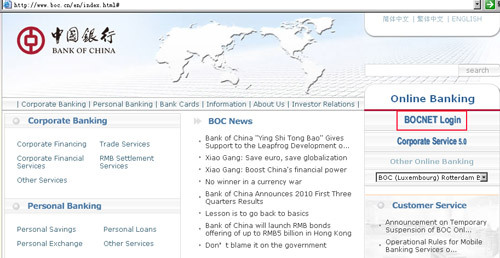
1. Click "BOCNET Login" at www.boc.cn
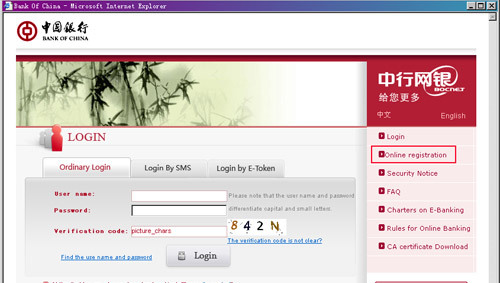
Select the "Ordinary Login" mode and enter "Online registration" on the right.
3. Complete opening online banking (Inquiry Version) after signing a service agreement and filling in necessary information.
|


